
Why an agent needs a Mac at all
Before September, Devin Cloud sessions ran on Linux and Windows. Devin could write Swift in those sessions, but it could not build or test what it wrote. For Apple platforms, building, testing and signing run on Apple hardware and macOS, so the agent depended on a customer's own continuous integration system or Mac fleet to find out whether its code worked.
A successful build was not the whole test either. AWS gives the example of a game that is supposed to resume where a player paused it after the app closes. Checking that means playing the game, pausing it, quitting, relaunching and confirming the saved state. That is a behavior test, and it needs a running app, not a compiler.
Two virtual machines per host
The capacity arithmetic is the part of the post worth slowing down for. Each EC2 Mac instance is a physical Mac mini or Mac Studio on its own Dedicated Host. On each host, Cognition's VM manager runs macOS guest VMs using Apple's Virtualization framework. Each host runs two isolated Devin workspaces at a time, because the macOS Software License Agreement allows up to two additional copies of macOS in virtual environments on each Mac, a limit macOS itself enforces.
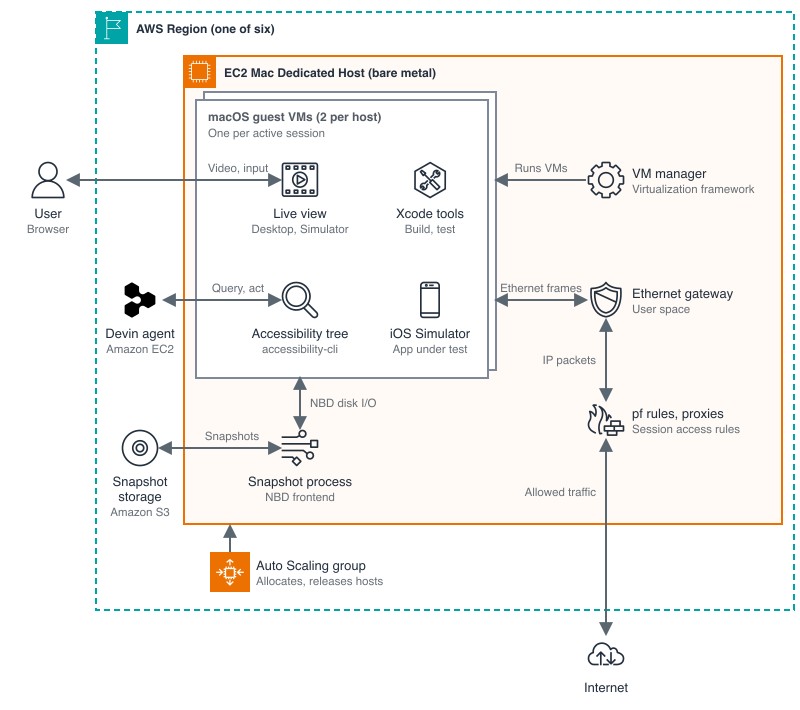
The 24-hour minimum applies to the host's allocation, not to any session: a host allocated for a short session stays allocated for the day. Cognition separates the life of a session from the life of a host, and uses Auto Scaling groups to allocate and release hosts in Regions where it has no preallocated capacity, but the 24-hour floor does not move.
Snapshots are how the arithmetic survives
If every session held its VM until it finished, two-at-a-time capacity would be exhausted by idle work. Cognition's answer is snapshots, handled on the Mac hosts by a process with a Network Block Device frontend. When a session goes idle, its VM shuts down, its disk state is saved as a snapshot, and the slot goes to another session. When the user returns, the session resumes from the snapshot.
Cognition reports that about 90% of sessions give up their Mac when idle and resume in seconds, and that an average session frees and reclaims its VM multiple times. That figure is doing a lot of work in this design, and the post gives no breakdown of session lengths to test it against.
The rest of the preparation is unglamorous and necessary. Guest images are prepared before first boot, with user accounts and the accessibility and screen-recording permissions set in advance, so a fresh macOS install's permission dialogs do not block the agent. Xcode is installed and verified and the iOS Simulator warmed up before a session starts. Devin operates apps through the accessibility tree, reading controls by role and name rather than guessing from screenshots, though AWS notes it still uses screenshots for visual checks the tree cannot cover, such as whether a game actually restored a player's position.
What the numbers do not show
Nearly 1,000 organizations in six weeks is a real adoption signal, and it is also a Cognition figure published in a post co-presented with its infrastructure provider. There is no pricing in the post: not for the EC2 Mac hosts, not for a Devin macOS session, and not for the snapshot storage underneath. Readers cannot work out from this account what a tested iOS build costs, only that it is now possible without owning a Mac.
That gap matters because the alternative is mundane. A team can buy a Mac mini, put it on a desk or in a rack, and run its own builds under the same Apple license terms and with no 24-hour rental floor. What Cognition is selling is not access to macOS. It is the removal of the fleet work: capacity through the EC2 API, images prepared in advance, idle capacity reclaimed automatically. Whether that is worth the price depends on a price this post does not give.
Sources
- [1] AWS Architecture Blog, "AI coding agents on Amazon EC2 Mac: How Cognition scales Devin for macOS," November 19, 2026Read source
- [2] Cognition, "Bringing macOS to Devin" (the launch account linked from the AWS post for the September 15, 2026 macOS support; cited by name, no figure in this article is taken from it)